 NOTE: For the rest of this discussion, I'll be using
"386" as a generic term to refer to the 386, 386SX,
486, 486SX, and Pentium CPU's. If something is specific to a
particular CPU, I'll mention it specifically.
NOTE: For the rest of this discussion, I'll be using
"386" as a generic term to refer to the 386, 386SX,
486, 486SX, and Pentium CPU's. If something is specific to a
particular CPU, I'll mention it specifically.
There are two major forms of virtual memory systems in wide use in the world today:
|
|
The basic concepts presented here apply to both segment swapping systems and paging systems. However, we'll be primarily focusing on paging systems in the discussion. In fact, the basic concepts also apply in the plain DOS world when applications are built using overlays as a way to get around 640K limitations.
[Overlays are really just a swapping mechanism where the swapping is being managed by code in the application rather than code in the operating system.]
Even if the program intends to touch only a few bytes in a 64K segment, the whole 64K segment will be brought into memory.
This bringing in of the whole segment is a good thing if programs are well designed and their segments contain only the code and data needed to do specific tasks. It's grim when programs are poorly designed and segments contain extraneous code or data to the task at hand because it can force the system's memory manager to "swap out" some other program running in the system to make room for code/data that aren't going to be used right away.
A picture of a paged system will look similar to the prior segment swapping picture with one change - all the boxes representing memory and swap file allocations will all be the same size - 4K.
The 386's 32 bit "flat" programming model is analogous to a "tiny" model .COM file program under DOS where the DOS loader initializes CS, DS, SS, and ES to all point to the program's PSP (program segment prefix) when the program is started.
Programmer's who are familiar with the way EMS memory works under DOS will notice that a 386 paged virtual memory system works in much the same way. The physical memory in the machine is analogous to the 64K EMS page frame. The various 16K EMS pages are analogous to a 4K virtual memory page. The sum total of available EMS memory is similar to the size of a program's virtual memory space provided by the operating system. Just as a 16K EMS page needs to be mapped somewhere into the 64K EMS frame to be accessed, a 4K page in a 386 virtual memory system needs to be loaded into physical memory before it can be accessed. Let me repeat that again - it's important.
For OS/2 you'd specify MEMMAN=NOSWAP in the CONFIG.SYS file. You'd better be prepared to have around 16+M of memory in your system, or it probably won't boot. With Windows 3.X, there's a setting in the control panel under the "386 Enhanced" icon where you can disable the Windows swap file. If there's only 6M or 8M of memory in your machine, you'll start running out of memory real fast opening up a few DOS boxes.
In reality, to run acceptably on machines without massive amounts of memory, most virtual memory systems are going to need to swap sometimes. Not everyone has, or can afford, machines with 32M or 64M of memory where they may have the luxury of running with swapping disabled.
[1998 update: That last paragraph was written sometime in 1994 when memory was relatively expensive, and 16M of RAM was considered a luxury. In 1998, most machines are shipping with 32M or 64M as standard, with 128M or 256M being not uncommon at all. Of course the situation has changed little in reality because the memory requirement growth of software in the last 4 years has been nothing short of incredible! A "mundane" old 120mhz Pentium in 1998 running with 32M of RAM can be brought to its knees very quickly with some of the bloated stuff on the market today. However, if you took that same machine and loaded it up with a 94' vintage operating system and some 94' vintage apps, it would be very responsive and fast with 32M]
Note the emphasis here on "normal operation". A couple of seconds of swapping in an editor during loading of a spell check module isn't going to upset the user too much. The disk drive will blip a few times and they're on their way. After all, spell checking a document isn't the kind of thing people do every 5 seconds. If however the program is so piggy that the drive is whirring away constantly when the user is just typing normal text, well that's going to a pretty serious annoyance to most people.
In a segment swapping virtual memory system (like Windows in "standard" mode, or OS/2 1.X), an analogous statement is that a whole segment needs to be present in physical memory before it can be accessed.
All of the programs running in the system are in competition for the machine's physical memory and the amount of virtual memory in the system is basically unrelated to this fact.
If our programs are being piggy and accessing different pages or segments like crazy, then other programs are going to be pushed out of physical memory by the system's swapper to make room for our stuff. This is going to cause overall system performance to suffer.
How bad can this cause us to "suffer"? Let's do an experiment and find out. Here's a little C program called MSPIGGY.C that allocates 16M of memory and then increments each byte of that memory in two different ways. The first way just bops down the 16M in a linear manner incrementing each byte, the second way skips pages incrementing a byte in a page and then moves to the next page. When it gets to the end of the 16M, it starts incrementing the second byte on a each page, then the third byte, etc. until all the bytes in each page have been incremented once.
/*
  MSPIGGY.C
  Demonstration of how memory accessing effects
  system performance in virtual memory systems.
*/
#include <stdio.h>
#include <stdlib.h>
#include <time.h>
#include <process.h>
#define BYTECOUNT (1024L*1024L*16L) /* 16 meg */
int main(void)
   {
   char *nums,*p;
   int i, count;
   time_t start,stop,delta;

   nums = malloc(BYTECOUNT * sizeof(char));
   if (nums == NULL)
      {
      puts("Out of memory!");
      exit(-1);
      }
   puts("Memory allocated OK. Starting linear access");
   fflush(stdout);

   start = time(NULL);
   for (p=nums, i=0, count=0; i<BYTECOUNT; i++)
      {
      *(p+i) += 1;
      count++;
      }
   stop = time(NULL);
   delta = stop-start;
   printf("Linear done. %d seconds elapsed,"
          "%d bytes incremented\n",delta,count);
   fflush(stdout);

   puts("Starting non-linear access");
   fflush(stdout);
   start = time(NULL);
   for (p=nums, i=0,count=0; i<4096L; i++, p++)
      {
      int j;
      for (j=0; j<(BYTECOUNT/4096L); j++)
         {
         *(p+(j*4096)) += 1;
         count++;
         }
      }
   stop = time(NULL);
   delta = stop-start;
   printf("Non-linear done. %d seconds elapsed, "
          "d bytes incremented\n",delta,count);
   fflush(stdout);
   return 0;
   }
On my 60mhz Pentium with 8M of memory, MSPIGGY is certainly going to cause some swapping action in both cases because it'll touch 16M of memory in both cases, but there's only 8M in the box. Clearly something is going to have to get thrown out of memory by the swapper at some point for this program to run in both cases.
When I ran MSPIGGY on the 8M Pentium test machine it ripped through the first phase in about 10 seconds and the disk light was on pretty constantly. Even with all the needed swapping, 10 seconds to increment 16 million bytes of stuff isn't too bad at all. The second phase was a little more disappointing. This one has been grinding away for over a half hour now and no end is in sight. I'm about to head into work, so I'll leave it running and we'll see if it's done when I get back home tonight!
Well, I'm back. MSPIGGY is still grinding away on my hard disk with no end in sight and it's been about 10 hours now. This is getting a little tiresome folks, and I've probably racked up a years worth of normal wear and tear on this drive so far. I'm going to have mercy on my drive and kill MSPIGGY now.
For the sake of this discussion let's assume that MSPIGGY would have completed just as I killed it.
This is pretty darn serious folks. MSPIGGY ran (at least) 3,600X slower on my 8M machine when it used the second method to access memory that skipped across pages rather than sweeping through them linearly.
Granted, MSPIGGY is a program that's specifically designed to bring a machine with less than 16M of physical memory to its knees with that second method of accessing memory. However, MSPIGGY is also a good example of how bad things can get when code isn't careful about the way its accessing its data. After all, the first method did take only 10 seconds to run!
Suppose we changed the number of bytes MSPIGGY was going to access to be only 4M rather than 16M? On my 8M machine we could probably expect that version to run a lot better when it hits the second method.
Well, I made that change and the results were as expected. The second method didn't hurt nearly as much as it did with the 16M version of MSPIGGY. I did a few runs with the 4M MSPIGGY and they clocked in at about 1 second for the first method, and about 10 seconds for the second method. We don't need to be rocket scientists to realize that 10 seconds is just a tad quicker than 10 hours divided by 4.
I was ran MSPIGGY under OS/2 Warp (and Windows NT 3.5) for this experiment. Suppose Warp and NT were capable of swapping out and swapping in 100 pages every second. This is a highly optimistic estimate for my machine by the way. The second MSPIGGY method was going to need about 16M swap in/out operations to run to completion. Given the optimistic swapping rate estimate, MSPIGGY would have needed about 16M/100, or about 160,000 seconds to run to completion. This is about 2,666 minutes or around 44 hours! MSPIGGY wasn't even close to being done when I got home. In fact, MSPIGGY was really just warming up. When I interrupted the run it was a mercy killing!
This would mean a run time of maybe 80 seconds versus 10. We could be 8X slower once swapping starts to happen for "average" code accessing memory in a somewhat sloppy way. Is this really possible? Actually it can be a lot worse depending on how tight memory is in the machine.
Performance in virtual memory systems generally follows what's known as a "knee curve".
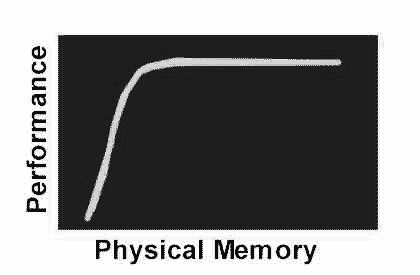 |
Once you cross a certain memory threshold, performance starts to plunge dramatically. Well written, tuned up programs are going to delay the point at which any given system hits "the knee" on the curve. This means customers will be able to run more apps at any given time, or maybe opt for a larger disk cache to boost disk performance. |
Being sloppy about memory accessing, even when there's plenty of memory hurts too though! All memory is not the same folks.
You see, there's this small matter of caches. When a machine gets an on-chip CPU cache hit for a memory access, it's going to be dramatically faster than a miss where the CPU has to wait for a main memory from slower external DRAM's.
Let's go back to the MSPIGGY example to see how the cache plays a big part. Remember the timings for the 4M version of MSPIGGY on my Pentium with 8M? 1 second for the first method and about 10 seconds for the second method. Could the additional bit of pointer arithmetic needed for the second form have caused the 10X slowdown? Not likely, that seems a bit much. Maybe 3X or 4X would be believable, but 10X is a bit much to swallow. Even the worst C compiler isn't that bad. The outer loop code in the second method is only executed 4096 times too. On any Pentium, the time to execute the outer loop is going to be virtually nil. Heck, even a clunky old 4.77mhz 8088 machine could execute the outer loop instructions in under 1 second.
[1998 update: The Intel Pentium MMX CPU's have doubled the size of their on-chip caches (which is why they're a tad faster than non-MMX CPU's running at the same clock speed, even when not doing MMX specific operations). Also, a whole bunch of Pentium clone chips have appeared and all sorts of cache architecture variants along with them -- for example the Centaur C6 CPU's which have a 64K monolithic (i.e. combined I & D) cache.]
In MSPIGGY, the 8K I-cache is more than enough to hold those loops where all the action is occurring as the bytes get incremented, so clearly the I-cache isn't the problem here. The 8K D-cache has to be the major player in this program.
8K / 32 = 256. This means there's 256 cache lines of 32 bytes each in the I and D caches. When the Pentium accesses a chunk of memory that's not cached, it's going to cause at least one, and maybe two, cache lines to be loaded from external (i.e. slower) memory. A two line load will occur when a data item spans a 32 byte boundary in memory. In this case, the Pentium will load a cache line for each of the 32 byte areas the item is spanning.
The relevant fact here is that there's only 256 lines in the Pentium's I and D caches.
Let's think about this for a bit. The situation is kind of similar to the notion of page swapping to a hard disk. Consider those 256 cache lines as if they were "physical memory", and think about the main memory in the machine as if it were "virtual memory". Physical memory is typically a scarce resource compared to virtual memory. If we don't find a page in physical memory, then it needs to be swapped in. If the Pentium doesn't find data in one of the cache lines, then the line (or lines) containing that data need to be brought in!
OK, now that we've got a basic understanding of cache lines on the Pentium, we can start to understand how the 4M version of MSPIGGY is behaving with regard to the D-cache.
4M of memory takes up 1024 4K pages right? The second method in MSPIGGY goes bopping along memory in 4K increments whereas the first method bops along in 1 byte increments. Hmmm, 1024 is more than 256. There's only 256 D-cache lines available, and we're having to reload one for virtually every iteration through that inner loop the second method uses.
The first method is a lot more "cache friendly" to the Pentium's D-cache because it accesses memory in a linear manner with those one byte increments. Once the first method touches a byte in a cache line and causes it to be brought in, we're going to see 31 hits in that D-cache line before another line might need to be brought in!
Test to explore Pentium D-cache performance /* DCACHE.C Demonstration of how the Pentium D-cache can effect performance. */ #include <stdio.h> #include <stdlib.h> #include <time.h> #include <process.h> #define REPS (65536*10) #define IN_D_CACHE ((128+64+32)*32) /*256 lines available */ char stuff[1000000]; char c; time_t start,stop,delta; volatile int incr, halt; /* Volatile should force the compiler */ /* to access rather than enregister */ int main(void) { register int i,j,count; puts("Starting linear access"); fflush(stdout); /* This loop's data accesses should sit nicely in the Pentium's D-cache. */ incr = 1; halt = (IN_D_CACHE*incr)/16; count = 0; start = time(NULL); for (j=0; j<REPS; j++) for (i=0; i<halt; ) { c = stuff[i]; i+=incr; c = stuff[i]; i+=incr; c = stuff[i]; i+=incr; c = stuff[i]; i+=incr; c = stuff[i]; i+=incr; c = stuff[i]; i+=incr; c = stuff[i]; i+=incr; c = stuff[i]; i+=incr; c = stuff[i]; i+=incr; c = stuff[i]; i+=incr; c = stuff[i]; i+=incr; c = stuff[i]; i+=incr; c = stuff[i]; i+=incr; c = stuff[i]; i+=incr; c = stuff[i]; i+=incr; c = stuff[i]; i+=incr; count += 16; } stop = time(NULL); delta = stop-start; printf("Linear done. %d seconds %d touches\n", delta, count, c); fflush(stdout); puts("Starting non-linear access"); fflush(stdout); /* This loop's data accesses will thrash the Pentium's D-cache. */ incr = 32; halt = (IN_D_CACHE*incr)/16; count = 0; start = time(NULL); for (j=0; j<REPS; j++) for (i=0; i<halt; ) { c = stuff[i]; i+=incr; c = stuff[i]; i+=incr; c = stuff[i]; i+=incr; c = stuff[i]; i+=incr; c = stuff[i]; i+=incr; c = stuff[i]; i+=incr; c = stuff[i]; i+=incr; c = stuff[i]; i+=incr; c = stuff[i]; i+=incr; c = stuff[i]; i+=incr; c = stuff[i]; i+=incr; c = stuff[i]; i+=incr; c = stuff[i]; i+=incr; c = stuff[i]; i+=incr; c = stuff[i]; i+=incr; c = stuff[i]; i+=incr; count += 16; } stop = time(NULL); delta = stop-start; printf("Non-linear done. %d seconds %d touches\n", delta, count, c); fflush(stdout); return 0; }
The basic idea behind DCACHE.C is to have two identical loops that touch bytes in memory. The first loop skips through memory a byte at a time. In theory this should work well with the D-cache because we'll be getting lots of hits on subsequent accesses due to the 32 byte cache line loads. The second loop is more hostile and skips through memory in 32 byte increments. In theory this will cause the vast majority of a cache line data, when a byte is touched, to be wasted.
All of the iteration counts in DCACHE.C are arbitrary by the way. I picked them to be big enough so the program would run long enough to generate some timings that would make for useful comparisons on my 60mhz Pentium. The test machine is running OS/2 Warp with 8M. There's no disk swapping going on with this configuration when DCACHE runs, so we can rule out disk I/O as an influence on the results. I compiled DCACHE.C using the Borland 1.5 OS/2 compiler taking all the defaults for options (i.e. "bcc dcache.c" as a command line). From prior experiments with this particular compiler we know it's going to dword align variables.
Starting linear access Linear done. 22 seconds 293601280 touches Starting non-linear access Non-linear done. 48 seconds 293601280 touches |
Starting linear access Linear done. 22 seconds 293601280 touches Starting non-linear access Non-linear done. 49 seconds 293601280 touches |
Starting linear access Linear done. 22 seconds 293601280 touches Starting non-linear access Non-linear done. 48 seconds 293601280 touches |
These results look pretty consistent - let's call it about a 2X speed difference due to the effects of the Pentium's D-cache. Unrolling the critical inner loops in the DCACHE code 16 times helps to ensure we're not just measuring the looping activity here.
The real D-cache effect is actually going to be a lot more than 2X because there's a constant cost for looping and pointer incrementing factored into the timings on those loops.
If we did a calibration run on the loops and took out the memory touch we could get a better idea of what the true gain is. It's 4:00am though and I'm kind of tired, so I'll leave that up to you, gentle reader, as one of those proverbial "exercises".
I'm content to know that the Pentium's D-cache is a serious item and that "data locality" is a very important thing for the Pentium. It means that we'll need to pay attention to getting related data items onto the same pages in the virtual memory space (lest our programs behave like MSPIGGY did and turn people's machines into disk exercisers). We will also need to pay attention to the way that data is laid out within a particular page if we'd like to really scream on a Pentium.
How much less tolerant can a 486 be? I ran DCACHE on a 486SX-25 machine I've got that doesn't have any external cache (i.e. its got only the 8K internal cache). The results from two trials on the 486SX were:
Starting linear access Linear done. 86 seconds 293601280 touches Starting non-linear access Non-linear done. 327 seconds 293601280 touches |
Starting linear access Linear done. 87 seconds 293601280 touches Starting non-linear access Non-linear done. 340 seconds 293601280 touches |
By the way, it turns out that this version of DCACHE was treating the 486's cache pretty good for the linear access part of the run. The total code size for the whole DCACHE.C module was just over 1K (041A bytes according to the Borland TDUMP utility):
000183 SEGDEF 1 : _TEXT DWORD PUBLIC USE32 Class 'CODE' Length 041a
The size of the data being whacked on in the Pentium's D-cache,
was 7K because of this #define:
#define IN_D_CACHE ((128+64+32)*32)
This means the unrolled loops, and the data were parked nice and snug in the 486's 8K cache.
[C:\]dcache Starting linear access Linear done. 474 seconds 293601280 touches Starting non-linear access Non-linear done. 469 seconds 293601280 touches |
Nothing dramatic here, those numbers are fairly close. I expect the slight variance is due to some minor instruction dword alignment effects in the loops. 386's can be sensitive to that kind of code positioning.
[D:\]dcache Starting linear access Linear done. 735 seconds 293601280 touches Starting non-linear access Non-linear done. 695 seconds 293601280 touches |
Again, nothing too dramatic in the way of differences.
. Clearly it would be very
tedious to design a program where everything was sitting in the CPU's
internal cache all the time. After all, 8K or 16K isn't exactly a
huge amount of memory.
External caches typically run from 64K up to a meg. Even a small 64K external cache is a pretty serious weapon if the code and data aren't too sloppy. There are 16 4K pages that can fit in even a small 64K external cache. In reality, 64K is quite a bit of code and a fair amount of data. Even with the worst C/C++ compiler, you'll have to be writing code for a little while to generate 64K worth of executable code. With assembler code, you'll really be working for a while to generate 64K worth. Think back to the days of IBM's original PC. The whole BIOS for the system, plus the embedded Microsoft BASIC interpreter, all fit into well under 64K worth of ROM.
Remember when I said we should strive to be good multitasking citizens?
 One of the fallout's of this cache discussion is that being a good
citizen is going to almost be automatic if we watch out for the
CPU's cache.
Getting code and data locality where things are parked in the CPU
cache also implies that we're not out whacking pages willy-nilly
in a random way all over the place causing the system's swapper
to go berserk
(remember MSPIGGY?).
One of the fallout's of this cache discussion is that being a good
citizen is going to almost be automatic if we watch out for the
CPU's cache.
Getting code and data locality where things are parked in the CPU
cache also implies that we're not out whacking pages willy-nilly
in a random way all over the place causing the system's swapper
to go berserk
(remember MSPIGGY?).
 tonyi@ibm.net
- Shut up and jump!
tonyi@ibm.net
- Shut up and jump!